

Key Takeaways
- Start with the part’s shape, surface, material, and usable print area.
- Choose a process that matches the required detail, colors, durability, and production volume.
- Test real production parts before approving equipment, inks, fixtures, or artwork.
- Include worker safety, cleaning requirements, and quality controls in the process plan.
Table Of Contents
- Why Process Selection Matters
- Start With Part Geometry
- Compare Common Printing Methods
- Review Material And Ink Compatibility
- Balance Print Quality And Production Volume
- Plan Testing And Quality Control
- Include Workplace Safety
- Build A Practical Selection Checklist
- Final Thoughts
The strongest process choice considers geometry, substrate, artwork, durability, production demand, and workplace conditions together. Comparing these factors early helps manufacturers avoid poor adhesion, distorted graphics, unnecessary setup costs, and difficult rework later.
1. Why Process Selection Matters
The same artwork can require very different printing approaches depending on where it will appear. A flat nameplate offers direct access, while a curved control knob changes how the image contacts the part. Recesses, sharp edges, limited landing areas, and molded textures add further variables. The newest process is not automatically the best choice. A dependable result usually comes from matching the process to the part and its intended use.
2. Start With Part Geometry
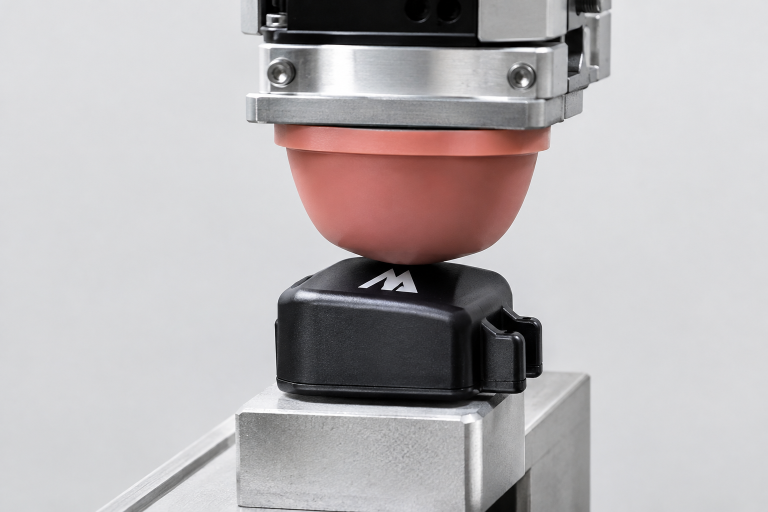
Examine the actual print location before comparing specifications. Flat surfaces may allow several options, while convex curves, concave areas, deep recesses, and narrow edges limit access. Small parts also require reliable fixtures to hold the component in a repeatable position. Pad printingtransfers an image from a plate with a silicone pad, which is why it is often evaluated for compact and irregularly shaped components. Textured or flexible parts still need sampling because the surface can affect coverage and edge definition.
3. Compare Common Printing Methods
Pad Printing
Pad printing is commonly considered for small graphics, spot colors, curved surfaces, and recessed locations. Results depend on the relationship between the artwork, pad shape, plate, ink, fixture, and part surface. It can be a practical choice when a direct, rigid printing head cannot reach the target area consistently.
Screen Printing
Screen printing can suit larger or flatter areas, especially where a bold graphic or a heavier ink deposit is useful. It may become less practical when curves are tight, the image wraps around a part, or the target area is difficult to reach without distorting the print.
Digital UV Printing
Digital UV printing can support full-color artwork, variable information, and frequent design revisions. It may reduce setup work for short runs, but users should confirm surface-height limits, curing conditions, adhesion, and whether the part can be positioned consistently beneath the print system.
Laser Marking, Labels, And Transfers
Laser marking can create a mark without liquid ink when the material responds appropriately to the laser. Labels and transfers can be useful for changing designs or limited production, but their edges, adhesive performance, moisture resistance, and abrasion resistance should be evaluated for the actual environment.
4. Review Material And Ink Compatibility
Identify the substrate before selecting ink or marking settings. Plastic, metal, glass, rubber, coated materials, and painted surfaces can behave differently. Surface oils, dust, mold-release residue, or texture may interfere with adhesion. Some applications need cleaning or pre-treatment before marking. For example, a printed plastic control knob may look acceptable at setup but fail after repeated handling if the surface was contaminated or the ink system was not matched to the material.
5. Balance Print Quality And Production Volume
Volume changes the economics of process selection. Compare initial tooling and setup, per-part cost, number of colors, registration needs, operator involvement, automation potential, and expected artwork changes. A long production run of identical parts may justify dedicated tooling and a more automated workflow. A short run with frequent design changes may favor a process that reduces changeover time, even if its per-part cost is higher.
6. Plan Testing And Quality Control
- Define the required graphic size, location, colors, and acceptable variation.
- Use sample parts made from the same production material and finish.
- Evaluate relevant pad, ink, fixture, curing, or marking settings.
- Inspect sharpness, coverage, registration, color consistency, and placement.
- Perform durability checks that reflect real handling, cleaning, heat, moisture, light, or chemical exposure.
- Record approved settings so the process can be repeated.
A simple operator checklist helps maintain consistency during setup and throughout a production run. It should identify the approved artwork, fixture, consumables, cure requirements, inspection points, and actions to take when results fall outside the agreed standard.
7. Include Workplace Safety
Safety planning belongs alongside print-quality planning. Inks, cleaners, thinners, and other process chemicals may require specific handling, storage, ventilation, and protective equipment. Printing operations can involve solvent vapors and chemical exposure, so teams should review each product’s Safety Data Sheet, keep containers closed when not in use, control spills and waste, and train workers on normal and emergency procedures.
8. Build A Practical Selection Checklist
- What material, finish, and surface condition does the part have?
- Is the print area flat, curved, recessed, textured, flexible, or very small?
- How many colors, how much detail, and what placement tolerance are required?
- Is variable data needed, and how frequently will the artwork change?
- What handling, cleaning, weathering, or abrasion must the mark withstand?
- How many parts are needed per shift or per year, and what automation is practical?
Final Thoughts
Process selection should begin with the part, not an equipment catalog. When geometry, material, graphics, durability, volume, and workplace conditions are reviewed together, manufacturers can narrow the options quickly. Testing a small set of representative parts before full production remains one of the most reliable ways to identify problems early and choose a repeatable printing process.

FOLLOW ME ON SOCIAL MEDIA


No comments:
Post a Comment
I love reading and responding to comments but in order to get my reply you must ensure you are NOT a no-reply blogger. If you are, here are some quick steps to change that!
1. Go to the home page of your Blogger account.
2. Select the drop down beside your name on the top right corner and choose Blogger Profile.
3. Select Edit Profile at the top right.
4. Select the Show My Email Address box.
5. Hit Save Profile.